

 BizTut Team
Disclosure: This post contains affiliate links. If you buy through them, BizTut may earn a commission at no extra cost to you. We only feature tools we think are relevant to our readers, and this doesn’t change our opinion.
If you freelance, run a small marketing service, or want to start one, the hardest part is usually finding clients and explaining what you can do for them. ProfitMaps AI tackles both by showing you, on a map, where a local business is missing from Google Maps results. You can then put that in front of the owner in a way they understand in seconds.
This review covers what the tool does, who it’s for, what’s included, the pricing, and the points to consider before you buy.
What is ProfitMaps AI?
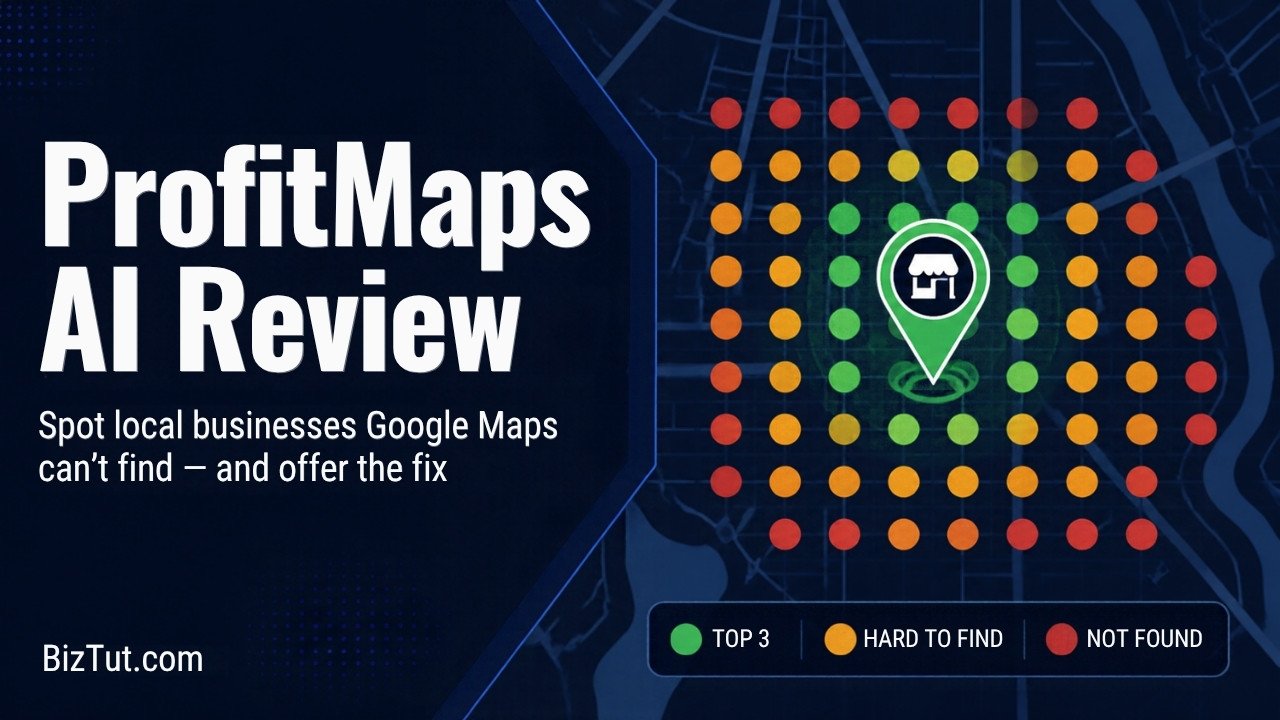
ProfitMaps AI is a local-marketing tool from Chad Nicely and Karthik Ramani. It runs a grid scan across the area around a business for a search like “plumber near me”. At each point on the grid it records where that business ranks in Google Maps. The result is a colour-coded map that shows where the business appears in the top 3, where it’s hard to find, and where it doesn’t show up at all.
This is useful because most owners only search from their own shop or home, where they often rank well. A customer three miles away may not see them at all. The scan makes that gap obvious.
How it works
- Pick a business and a keyword. For example, a local dentist and “dentist near me”.
- Run the scan. The tool checks rankings across a grid of points around the business.
- Share the report. You get a visual report with your own name and logo on it, which you can send to the owner.
- Offer to fix it. If the owner wants better visibility, you can offer improvements as a paid service, using the tool’s AI helpers for the work.
What’s included in the entry version
According to the vendor, the entry-level ProfitMaps AI Basic includes:
- Tracking for up to 10 customers, with 2 keywords each
- A 5×5 scan grid (the Pro upgrade and the bundles use 9×9)
- Competitor analysis
- A website generator (up to 10 sites)
- Lead capture
- AI generators for posts and articles
- An AI planner
- MCP access, so it can connect to AI assistants
Who is it for?
- Freelancers and side-hustlers who want a simple local marketing service to offer.
- Small agencies and consultants who need a quick, visual way to start sales conversations.
- Local business owners who want to check their own Google Maps visibility without paying an agency for an audit.
It works best for service businesses where customers search “near me”: trades such as plumbers, electricians and roofers, plus dentists, salons, gyms, vets and similar.
Pricing
The entry version (Basic) is listed at $37. After buying, you’ll be offered optional upgrades, including Pro, Business Finder and Agency tiers. There are also two bundles, Gold at $297 and Platinum at $697, which combine several upgrades. You don’t need any upgrades to use the core scan-and-report workflow, so start with Basic and only upgrade if you need more customers, keywords or a bigger grid.
Prices are in US dollars, so the amount you pay in pounds depends on the exchange rate. Check the sales page for current pricing and refund terms before you buy.
Pros and cons
What we like
- A clear, visual way to show a business owner a real problem, so there’s no jargon-heavy SEO pitch.
- Branded reports make you look professional from your first contact.
- Low entry price compared with most local SEO platforms.
- Useful for business owners checking their own visibility as well as for freelancers.
What to weigh up
- The report finds the problem, but fixing it still takes effort. You’ll need to learn the basics of Google Business Profile optimisation and local SEO.
- There are several upsells after purchase. Decide your budget before you buy.
- Software alone won’t bring you clients. You still have to contact businesses, follow up and deliver results.
A note for UK users
“Near me” searches behave the same way in UK towns and cities, so the method works here too. If you offer this as a service, keep your outreach honest. Show the owner the real scan, don’t promise specific rankings, and follow UK rules on unsolicited marketing, particularly for email to sole traders and partnerships.
Verdict
ProfitMaps AI is a practical, low-cost way to find local businesses with a visibility problem and start a useful conversation with them. It isn’t a shortcut to income. Treat it as a prospecting and reporting tool that supports a real service you’re willing to deliver. On that basis, the entry version is worth considering for freelancers and small agencies building a local client base.
Results depend on your own effort, skills and market. BizTut makes no claims about what you’ll earn with this or any other tool.